cat viflix.md · · 12 min read
I built my own Netflix
If you're ever a guest at my house, you'll quickly learn that we don't have Netflix, Apple TV, Disney+, or any others. We have Viflix.
Named after my wife, Vi, this is an endlessly complex front-end for the heavy lifting done by Jellyfin and the -arr stack. Altogether it's about 58k lines of Python, 33k of Javascript, 13k of CSS, a 5k-line Swift app for the "TV", and a 5k-line Kotlin app for the projector.
And for my fellow idiots, it's my own Netflix.
Don't do this at home (...seriously)
After 15 months of building this, I'd strongly advise against doing the same. Even if it is cool as heck.
My v1 was a folder of movies on an old Macbook Pro 2016, a PWA for my phone that displayed and searched them all, and a 1-click open -a IINA to launch them on my TV connected laptop.
That became a Netflix-like interface. Custom player. Bluetooth remote controlled. Custom rows for discovery. Live TV integration (via IPTV, free legal sources of course). Custom match score algorithm.... and more.
I would not set out to build this from scratch. It's not really worth it, knowing the time and effort it'd take.
Thankfully, using it is a breeze. There are no guides or tutorials, any time my wife got stuck or confused, I fixed the UX so it wouldn't happen again. Let me show you.
Using Viflix
The Library
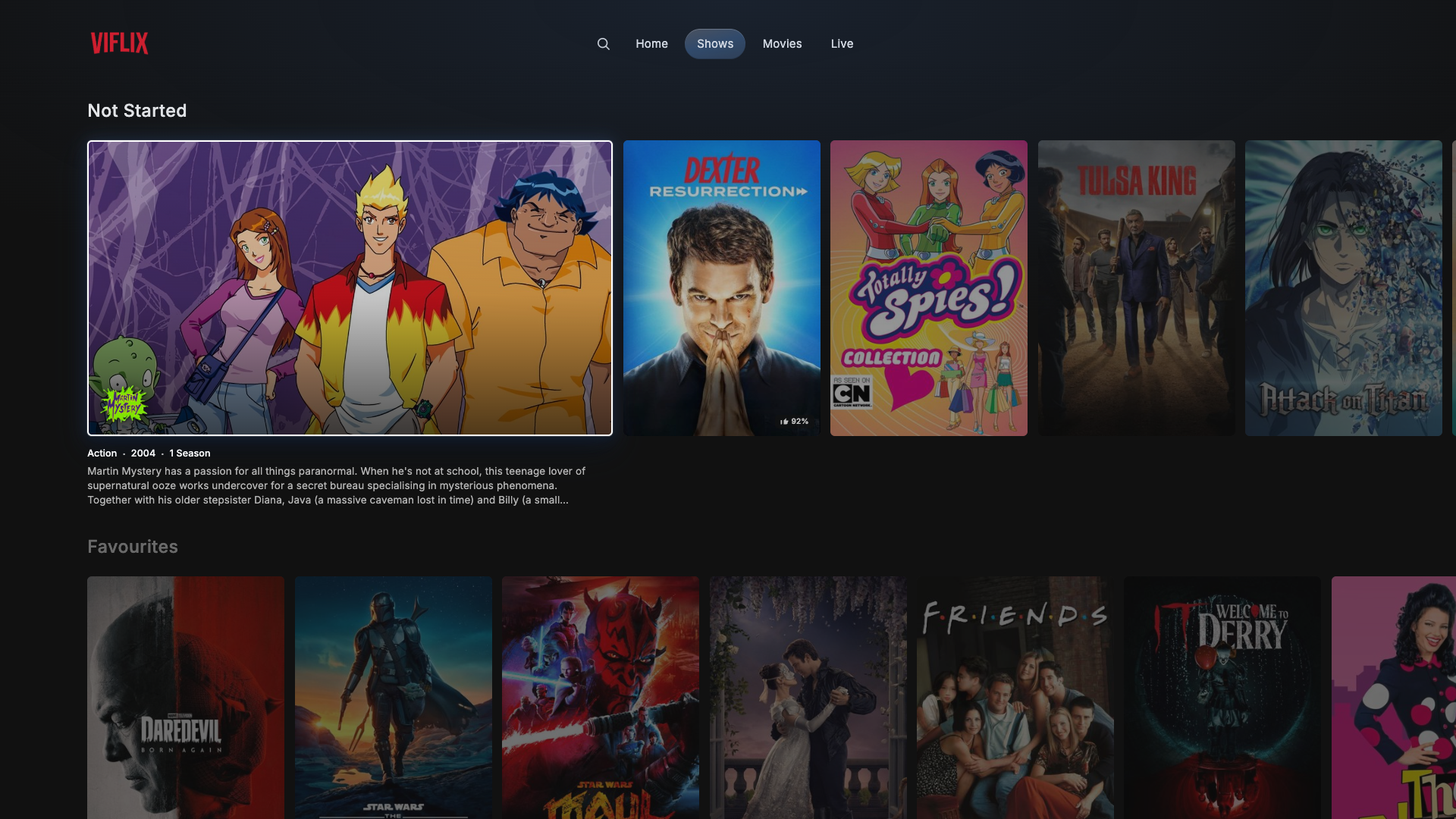
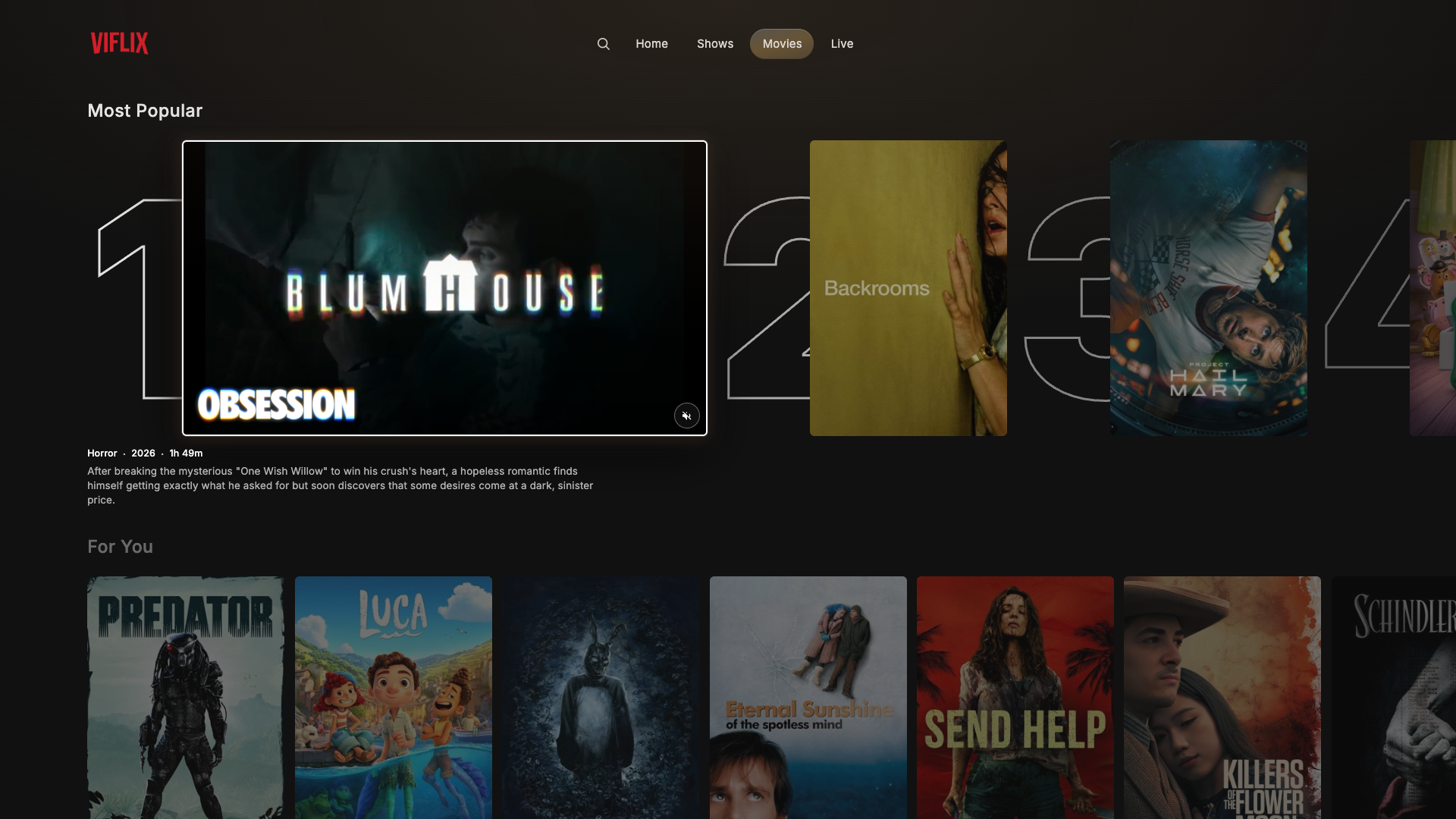
It starts with a home screen. That's every show, every movie, all in one place. Rows to organise and discover. Continue watching at the top (always).
Latest releases next, we tend to watch new stuff most often. Then Most Popular, based on TMDB trending, filtered to our own library. For You, built on our own match engine. Unwatched, prioritising longest in library, then highest match score, easy way to find some gems we missed.
Then algorithmic rows. Because you watched X. Genres or categories like "Root for the Bad Guy". Actors, directors, and composers that we like. And All Movies / Shows on their own tabs, though you'd be better off searching in most cases.
Home is the default, then there's Movies which is essentially the same but filtered, and Shows which is a simpler version. And Live, which is a hand-picked list of live TV channels.
Recommendations
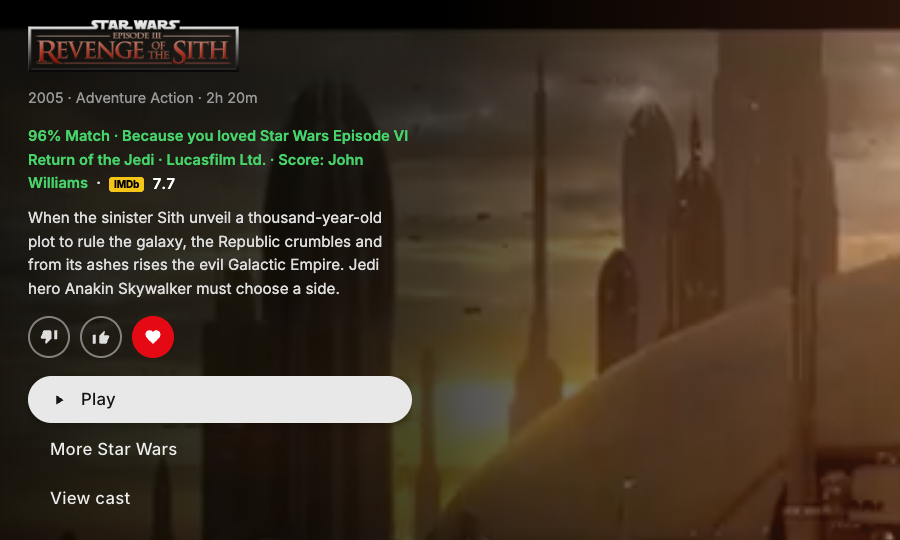
TMDB related movies were failing miserably, so I built my own match score to estimate how likely we are to enjoy a movie/show. I use this in tandem with IMDb ratings.
I rated over a thousand movies based on my wife's and my preferences to train it (e.g. Princess Diaries got a love, despite my lack of interest). Then created an elastic-net "taste learner" over genres, people, keywords, and studios based on these and ongoing ratings.
Now everything shows a match score and reasoning:
Searching
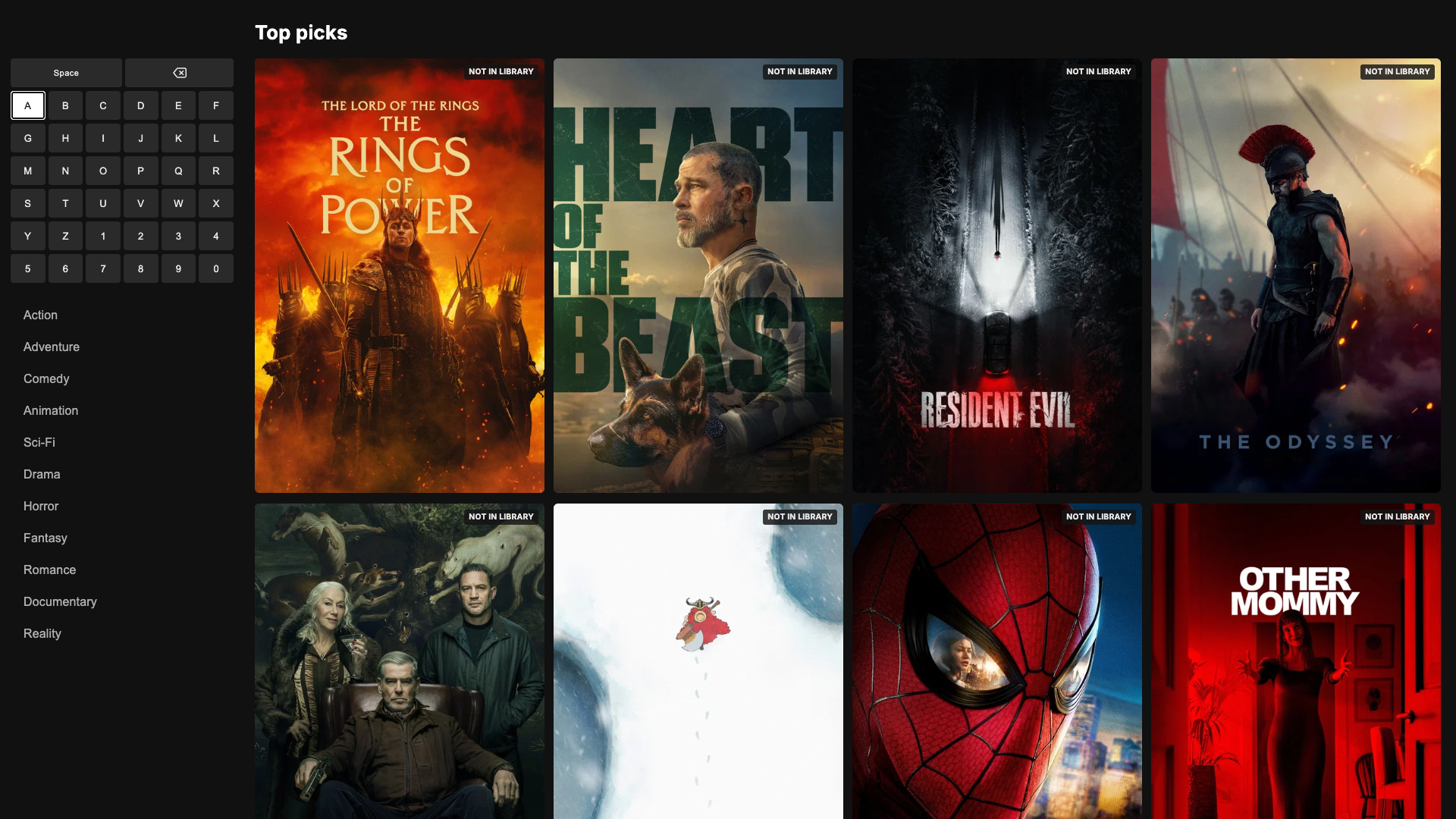
If you can't find what you're looking for, search is a click away. Search acts as both discovery and filtering.
First pass is a scope=library query. That lets you find media we own by name, genre, people, or metadata. Second pass is a debounced scope=full, that pulls from TMDB.
Now it's useful for not only finding what we have, but discovering new items. And if you find something interesting?
Open it up. You'll get a full TMDB backed details page, an estimated match %, and a button. Now I would never do this, but theoretically if you wanted to, this button could POST to an endpoint that adds the title to Radarr or Sonarr, which goes off, finds it matching your profile settings, downloads it, fetches the subtitles (via Bazarr), adds it to your library, then auto-refreshes the library so it's available within 30 seconds of completion. But that's just theoretical, of course.
For me, I'm obviously just using Radarr and Sonarr for media management. And only have media from DVDs that I own. Of course.
Item details
When you land on something, focus for the trailer (muted autoplay from cached yt-dlp videos), and click to expand.
Details include the title, year, genres, match score, IMDb rating, description, and our rating (or option to leave one). For shows, this will be episode specific details if you open it from Continue Watching.
Action buttons here include:
- Continue playing or Play movie/episode
- Play from beginning (if we're midway through)
- Episodes (for navigating other episodes, used constantly for our regular rewatched shows)
- View cast (we almost never use this, but we had the data so why not)
- More [collection/universe] (e.g. More Star Wars to see other movies in this universe).
- Remove item (hidden if you scroll down, for media management)
So if you fancy a Marvel night, you just pop open the MCU menu, and there's every single MCU movie both in-library and missing. Hand curated since TMDB works from collections e.g. Avengers, not universes like MCU.
Press Play
Press play and you'll see our Viflix intro. Made entirely by Claude using Blender. Please don't sue me Netflix, it's just for fun at home.
After that the media will play right away, every time. Preloading begins when you hover a card for a second or open the details, plus the 4s intro clip, it feels instant.
Episode intros are automatically skipped. Including recaps. At my wife's request, one-click cancel if you'd prefer not to.
Skip markers come from Intro Skipper first. But it only found intros in 16% of Modern Family, and TheIntroDB (the fallback) put the credits 2-11 minutes early, so Up Next would cut off the ending mid-scene. So I built my own detector for shows. It fingerprints the audio that every episode in a season shares (that's the intro and credits), then checks the picture to make sure the "credits" aren't actually a scene.
The Player
I built custom controls for the player to fit the look and feel of the app, while giving far more control. Playback, transcoding, etc is handled by Jellyfin.
1-click to pause. Left or right to jump 10s. Scrubber for faster jumping and trickplay via Jellyfin for preview thumbnails.
Episodes viewer for shows. Collection viewer for collections/universes. Same as the details page. Next episode to skip.
Audio for language switching. Defaulted to English if available, or the item's default language. I cannot stand dubbing. But selectable as a backup, saved per title in SQLite.
Subtitles for changing subs. Defaulted to Vietnamese, if available, for my wife, or English, if not. Subtitle downloading via OpenSubtitles if it's low quality, not a match, or otherwise has issues. Syncing via ffsubsync if it's not timed properly.
Up Next
Finish an episode, and it'll automatically queue up the next one. Pre-loaded in the background, autoplaying with a 22s countdown warning in advance. Timed for the credits start or end of file if none detected/listed.
Movies will have the same as a suggestion for franchises/collections, but 1-click play, never autoplay.
Controls
Bluetooth remote control replicates keyboard navigation. Every feature of the app can be navigated by keyboard. Including an on-screen keyboard.
Vi Remote PWA on our phones as an alternative. Built touch-first with gestures to navigate, hold to speak. We tend to use this more these days as we can never seem to find the remote. Should have thought of this before spending $45 on the remote. Oops.
Of course there's a separate version for web and phones, which works with touch and mouse. We just rarely use them.
UX Polish
I've spent a considerable amount of time improving the UX, along with the overall speed and feel of the app.
Speed
Everything should happen ideally within 100ms of an action, maximum 200ms. This is surprisingly difficult for media on a 10-year-old laptop.
I built benchmarks for basically every action in-app, then had Claude measure each and help me action plan fixes to hit these targets. Pressing an arrow on the remote used to take about 650ms to show on screen, now it's about 150ms.
Most important was lazy loading and pre-loading almost everything. Rows are cached and lazy-loaded, the first 3 load with the page, the rest right after, and only rows near where you are draw their cards. Cards/posters within a row are similarly lazy loaded, until you reach near the edge.
Trailers and card backdrops are pre-loaded when you're near them. Media is preloaded when you focus for a second or click the details. Next episodes are preloaded 22 seconds before autoplay.
Animations
The antithesis to speed is my likely excessive use of animation. But it needs to look good.
Navigating between buttons like the header menu uses a jelly-like effect for smoothness. There's a similarly cool animation when switching between menu pages.
Opening an item stretches the trailer to fill the screen, then continues playing from the same point. Closing it shrinks it down the opposite way.
Navigating between cards feels smooth with the focus ring showing where you're at and gliding between cards.
Fading text between rows, dimming unfocused cards/rows, etc. Maybe overkill? But I like the feel of it.
Another cool one? The rubber-band animation. Reach the end of the row and this animation will let you know. Because sometimes we genuinely thought something had broken without it.
Background colour wash
The background colour isn't a theme. Each poster gets drawn into a 40x40 canvas and averaged, favouring colourful midtones:
ctx.drawImage(img, 0, 0, 40, 40);
const data = ctx.getImageData(0, 0, 40, 40).data;
for (let i = 0; i < data.length; i += 4) {
    const R = data[i], G = data[i + 1], B = data[i + 2];
    const bri = (R + G + B) / 3;
    if (bri < 24 || bri > 235) continue;
    const max = Math.max(R, G, B);
    const min = Math.min(R, G, B);
    const sat = max === 0 ? 0 : (max - min) / max;
    const weight = 0.3 + sat * 1.8;
    r += R * weight;
    g += G * weight;
    b += B * weight;
    n += weight;
}
Results go in an 80-entry cache. The final colour is 82% poster, 18% the page's base colour (sage for Home, gold for Movies, blue for Shows, red for Live).
Just gives it a little something nice when you're swiping around:
Stupid stuff I fixed along the way
Plenty broke over 15 months. A few favourites:
X-Men was a 22-minute TV special. Matching files to TMDB just took the first search result. So X2 became a 17-minute webcast, Spirited became Spirited Away, and The Lion King (2019) became the 1994 one. Now it prefers an exact title, then the year, then the vote count.
57 episodes of Dexter's Laboratory went missing. "S02E001" was read as episode 0, so 65 episodes squeezed into 8 slots and overwrote each other every scan. Three-digit episode numbers work now.
Pausing broke the audio. Pause for more than 30 seconds and the audio drifted out of sync. The fix restarted the stream when you hit play. Which looked like the end of the episode, so Up Next skipped us to the next one. Fixed that too.
Vi's subtitles turned to gibberish. Jellyfin doesn't say which encoding its subtitles use, so they were read wrong, and every Vietnamese accent mark broke the moment a sync fix was applied. Not ideal when they're the subtitles my wife actually reads.
The subtitle timing slider. A nightmare. At one point its arrows moved the subtitles the wrong way. So I built my own sync with Whisper (speech-to-text), which fight scenes kept fooling. Then found ffsubsync, the same approach Bazarr uses, and it just worked. The slider's gone. Auto-fix is the only option now.
The Stack
Hosting:
- Hardware: 2016 dual-core Macbook Pro permanently connected to the TV with SSH access, screen sharing, and the screensaver disabled.
- Supervision: launchd starts everything at login and restarts the core services if they crash.
- Access: Caddy for HTTPS, Tailscale for access across our devices
- Deploys: Push to GitHub (only if tests pass), then one command pulls, checks, restarts, and rolls back if it doesn't come up healthy
- Backups: Nightly SQLite backups
The app itself:
- Backend: Python + Flask, server-rendered Jinja templates, SQLite.
- Frontend: Vanilla JS and CSS. hls.js handles playback in the browser, with native HLS only for live TV.
- Recommendations and Match Scoring: Numpy + sci-kit learn as a nightly batch job.
- Tests: Pytest, Playwright browser tests.
Data sources and APIs:
- TMDB: Metadata, posters, search, trending, collections.
- OMDb: RT and Metacritic scores.
- IMDb: Ratings from the official dataset
- OpenSubtitles: Subtitles search and downloads.
- TheIntroDB: Alternative skip-marker source.
Media:
- Jellyfin: Streaming, transcoding, trickplay. Seriously, could not recommend it enough. The sane version of this whole post is to just use Jellyfin and not build a custom frontend like a maniac.
- Intro Skipper: Plugin for Jellyfin to skip intros/credits. I built custom checks on top as it kept cutting off specific shows at the wrong moments.
- ffmpeg: Bumper and intro detection, subtitle reference audio (for syncing), intro render's post-processing, etc.
- -Arr stack: Radarr (films), Sonarr (shows), Bazarr (subtitles), etc.
- yt-dlp: Trailers, cached locally.
- ffsubsync: Auto-fix subtitles sync
- Blender (driven from Python via bpy): renders the Viflix intro
Viewing:
- TV: Connected to my media server via HDMI (old mac) with a native macOS app in Swift (AppKit, WKWebView, AVPlayer for live TV).
- Projector: Old Android 6 TV box running a native app in Kotlin (Media3/Exoplayer, AndroidX Leanback grids, OkHttp, Coil, coroutines).
- Phones & Laptops: Responsive PWA
- Vi Remote: Another PWA, gestures and voice transcripts sent to the media server, then on to the TV over server-sent events.
- Satechi R2: Really nice bluetooth remote to control Viflix on TV. Custom mapped with Karabiner-Elements.
... I did warn you it was a lot.
How I built it
Cursor (yuck)
I started building the first version of this in August 2025. I've never used Python before, but told Cursor I wanted it in Python. I forget the specific model, most of my Cursor usage before switching to Claude was in auto mode. Sometimes Grok for planning, then auto. Back then, maybe it was Claude for planning. I forget.
The first version of the Viflix you've seen today was also built in Cursor. It messed up, a lot. I had to read the code, read the changes, diagnose the issues, and basically give it a solution to resolve most bugs.
It also had this annoying habit, with my codebase getting increasingly big, that every fix would end up in it breaking other features. So I had to check every implementation to make sure it wasn't messing with perfectly good features/files.
Claude Code + Opus 5.5
Opus 5.5 is very recent, but made all of this so much easier. It cleaned up my codebase. Created about 8,600 lines of tests, including Playwright browser tests. Helped me increase the speed/efficiency.
And basically did all of this without me having to look at a line of code. It probably wouldn't have taken me as long if I had this from the start. Though honestly, most of what makes this great is that I've spent 6+ months using it daily and fixing the bugs and issues along the way.
Android app
I was looking through an old cupboard last week and found an old Kiwibox (android tv box). So I asked Claude (Opus 5.5 High) to look at my repo and make an Android 6 compatible app to run on it.
It worked on first run. Then took a bit more effort to reach enough polish. Still a few minor issues, but it's working extremely well.
I've got it permanently connected to my projector now, so we can watch movies from our bedroom projected onto the wall. The Vi Remote works with the android app too.
That's about all I've got for you. 15 months of work and about 120,000 lines of code, apparently. But mostly, an awesome app that my wife and I use daily with little to no maintenance, if I could stop adding features at least.
Should you do this? Hellllll no. But if you do, it could be fun? It is for me.